Access Rights, Licensing, and Publication
How to manage and publish your recording.
Access Rights
Depending on where you publish your recording (e.g. in OLAT or SWITCHcast MediaSpace), you can configure the access rights and usage licenses there.
Default Settings
New recordings are set to «Private» by default.
As the person responsible for the recording, you can adjust these settings.
Access in OLAT
In OLAT, access is controlled by the course administrator via the course member management and the configuration of the «Kaltura» course element.
Access in SWITCHcast MediaSpace
- If you are not working with OLAT, define access rights directly in SWITCHcast MediaSpace.
- We recommend always assigning recordings to a channel, so that access is managed via the channel rather than individual recordings. If the required channel does not yet exist, you can create it yourself.
- Channel Playlists automatically inherit the access rights of the parent channel.
-
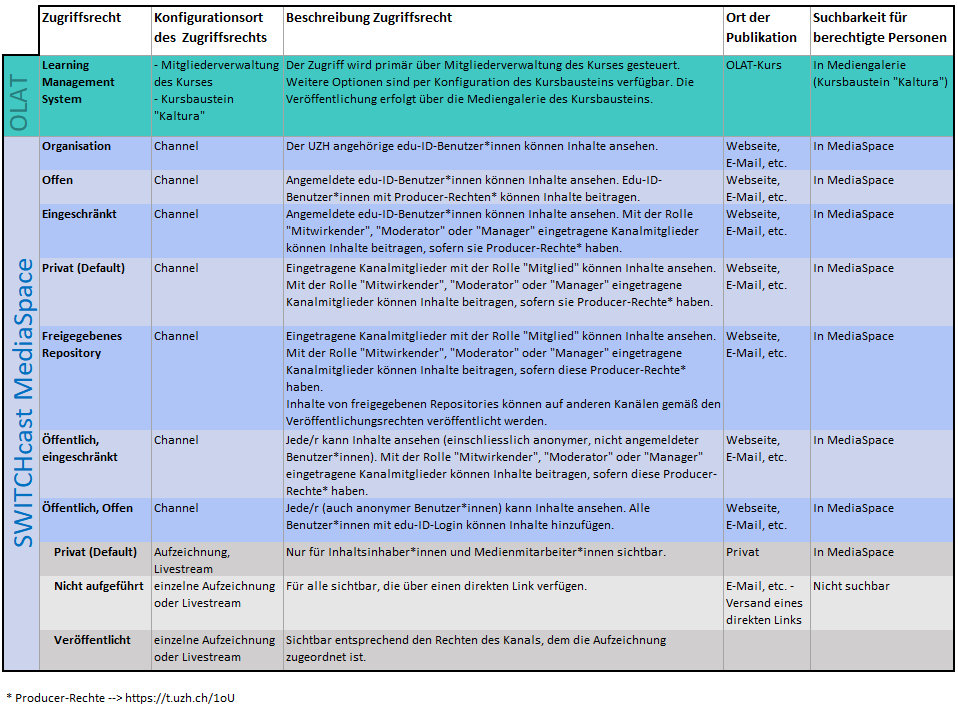
- Zoom
- Table: Available access rights options in SWITCHcast
By default, MELS sets the access rights for each recording to «private».
Extending the rights (e.g., «organization») may have copyright implications, as you may be making third-party material publicly available (e.g., images or slides from presentations). Therefore, please note the
Licenses
By choosing a license, you determine how authorized persons may use your content.
- If you specify a license in the video itself, select «As defined in content».
- Alternatively, you can use a «Creative Commons license» (see creative commons).
- Without an explicit license, «All Rights reserved» applies.
Recommendation: Always define a license to avoid misunderstandings about usage.
Publication
You can publish your recordings in various ways:
-
In OLAT: Add the desired recordings to the Media Gallery in the «Kaltura» course element.
OLAT Documentation -
On Websites: Embed your recordings into websites using embed codes.
Embed-Codes.
Note: Channels cannot be embedded, but you can create embeddable channel playlists.
Channel Playlists -
Via direct Links: Share links to individual recordings, channels, or channel playlists directly with your target audience.
Download
Currently, download files of event recordings include audio and the camera video.