Microsoft Copilot
Notes on the use of Microsoft Copilot at the University of Zurich
What is Copilot?
Microsoft Copilot is an AI-powered assistant that helps users complete their work tasks. Copilot is based on language models such as GPT-4 and also uses data sources available within the company (UZH) to generate context-sensitive, personalized suggestions, summaries, and content.
Costs
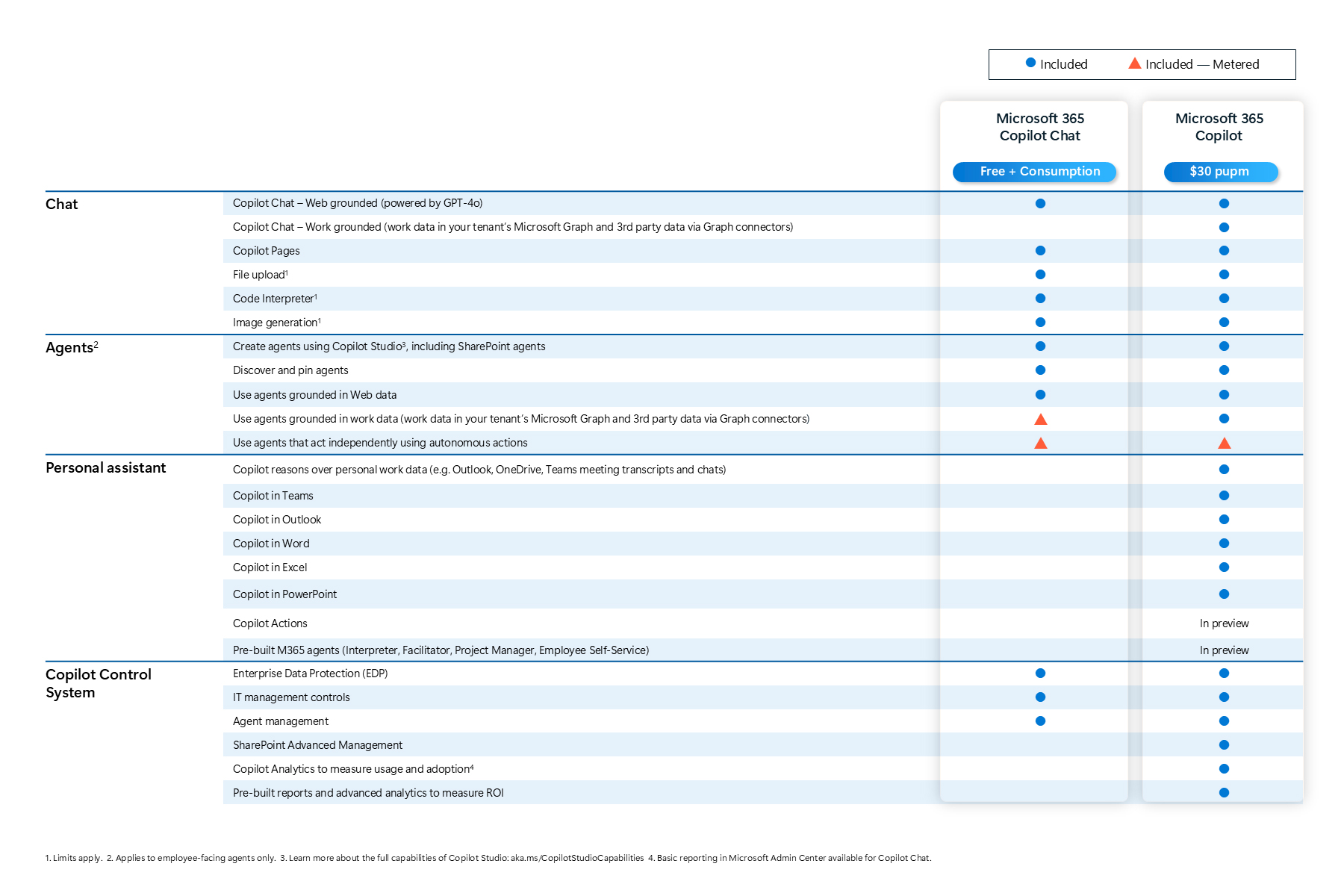
Copilot is available in a paid version (Microsoft 365 Copilot) and a free version (Microsoft 365 Copilot Chat).
Difference between Microsoft 365 Copilot and Microsoft 365 Copilot Chat
- Microsoft 365 Copilot Chat (no added costs) is the freely accessible version of Microsoft Copilot. The service is available to all Office 365 users. It is covered by existing licenses.
- Microsoft 365 Copilot (CHF 360/year) is the version integrated into the university's Microsoft 365 environment. It offers advanced features, including direct integration via add-ins for Outlook, Word, PowerPoint, Excel, and Teams. It can only be used with a UZH Microsoft 365 account.
Purpose and scope
This page explains the use of Microsoft 365 Copilot at the University of Zurich (UZH). It applies to all UZH employees who use a corresponding license via their UZH account.
Licensing and availability
Microsoft 365 Copilot can currently only be licensed for UZH employees. The product is not available to students.
Licensing involves significant monthly costs per user. Comprehensive provision for all university members is therefore not economically feasible.
You can order paid software such as Microsoft 365 Copilot directly from the UZH Software Portal, provided that your institute has been activated for this purpose – you can see this by the category "Bestellsoftware" being visible in the portal. If your institute is not authorized and the category is missing, please contact your institute's IT administrator to place an order.
Data protection and data security
The use of Microsoft 365 Copilot is only permitted with the official UZH Microsoft 365 account.
No particularly sensitive data (see links at the bottom of the page) may be entered in Copilot. Responsibility for compliance with data protection regulations lies with the user.
Microsoft 365 Copilot can only access data that the respective user account has access to (e.g., email, OneDrive, SharePoint). Sensitive data must be protected with particular care.
Responsible use
The results and suggestions provided by Copilot must always be critically reviewed (risk: “AI hallucinations”) and must not be accepted without verification.
Copyright and scientific standards must be observed. The use of Copilot must not violate the rules of good scientific practice.
Technical information and support
Microsoft 365 Copilot is integrated directly into the Microsoft 365 apps of the UZH. It is used within the infrastructure provided by the university.
If you have any questions about licensing, use, or data protection aspects, please contact the UZH IT Services: support@zi.uzh.ch
Links (general)
Data protection regulations of the University of Zurich
Integrity Ordinance of the University of Zurich
Popular AI Tools: What about data protection? (Vischer AG law firm)
Links (Copilot)
Comparison of Microsoft 365 Copilot Chat and Microsoft 365 Copilot
Copilot Chat (free)
UZH Softwarepilot
Introduction to using Copilot (Microsoft)